


How To Use The Wulf Mods Flat Plus 2.0 Variable Voltage Vaporizer

If you've just picked up the Wulf Mods Flat Plus 2.0 Variable Voltage Vaporizer… welcome to the Wulf Pack!
To help you get yourself acquainted and start ripping your new 510 battery like a pro, Wulf is here to provide you with a quick rundown on how to use the Wulf Flat Plus 2.0 Variable Voltage Battery to its fullest.
This way you can start ripping the most delicious, potent, and satisfying rips from your Flat Plus 2.0 from your very first puff onwards! With over a decade of supplying the Wulf Pack with superior vaping choices, we can’t wait for you to get acquainted with our latest Pack member.
Keep reading for an insider walkthrough on setup, operation, charging, maintenance, troubleshooting, and a few tips that will help keep your Wulf Flat Plus 2.0 performing like new for many sessions to come.
Table of Contents:
Getting To Know Your Wulf Flat Plus 2.0
Wulf Mods Flat Plus 2.0 510 Battery Setup
Quick View: How To Use Wulf Mods Flat Plus 2.0
1. Charge The Battery
2. Connecting Your Cartridge
3. Powering On The Wulf Flat Plus 2.0
4. Adjusting Voltages On The Wulf Flat Plus 2.0
5. Using Your Wulf Flat Plus 2.0
Wulf Mods Flat Plus 2.0 Maintenance Tips
Common Beginner Mistakes
FAQ: Using The Wulf Flat Plus 2.0
Unleash The Wulf Flat Plus 2.0
Getting To Know Your Wulf Flat Plus 2.0
Before taking a big bite out of setup, it's helpful to understand what makes the Wulf Flat Plus 2.0 battery stand out from the pack in the first place.
Well to put it simply with the Wulf Flat Plus 2.0 we set out to upgrade every last bit of the traditional 510 battery experience and after many sessions with the new battery, we can safely say we’ve accomplished even our wildest of dreams.
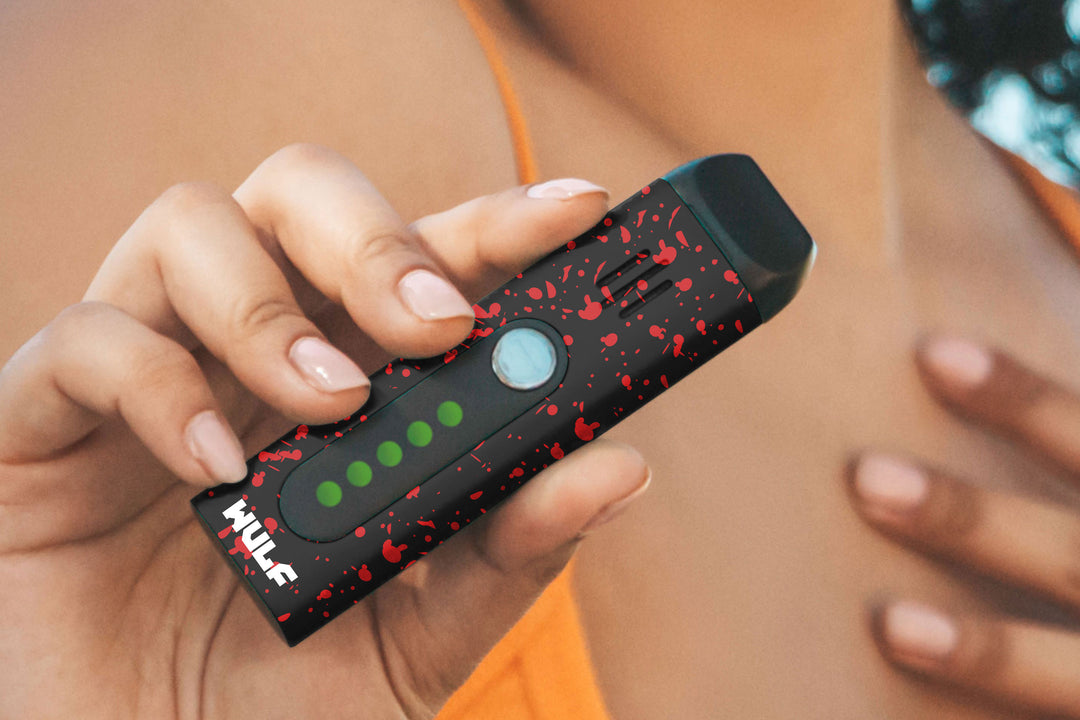
The Wulf Flat Plus 2.0 is an incredibly easy to use 900mAh battery that combines both single button operation and incremental voltage adjustment via dedicated + - buttons to make for a highly accessible experience that doesn’t forget to bring the customization.
With a slim size you can easily bring the Wulf Flat Plus 2.0 along on all your adventures, making for the ultimate pocket vaping buddy that works with situations of all types.
Wulf Mods Flat Plus 2.0 510 Battery Setup
With your Wulf Flat Plus 2.0 in hand and ready to start ripping, it’s important to follow proper set up protocols.
Essentially this is just inspecting your vape to make sure it’s clean, attaching your chosen 510 cartridge, and then pressing play to start vaping! Yes it really is that easy and thanks to universal cartridge compatibility of any size, you can use all of your favorite brands without issue.
Before using your Wulf Flat Plus 2.0:
- Inspect the charging port for debris.
- Remove any protective packaging.
- Make sure your cartridge is compatible with standard 510 threading.
Keep these in the back of your mind while firing things up and you’ll avoid anything from upending your session before it even gets going in the first place.
Quick View: How To Use Wulf Mods Flat Plus 2.0
Learning how to use Wulf Mods Flat Plus 2.0 is refreshingly simple and makes for an easy experience that still brings all of the next gen depth you’d expect from a second generation vaporizer releasing in 2026.
Steps include:
- Charge your battery
- Attach a cartridge
- Power On
- Choose your voltage level
- Use Your Wulf Flat Plus 2.0
In just 5 easy steps you can go from starting your session to wrapping it up in absolutely no time at all. This way you can focus more on living in the moment with your friends and less on struggling to understand your vaporizer.
Below we’re going to delve into each of the main steps and provide you with detailed step by step guides on how to start ripping the fattest of clouds with your Wulf Flat Plus 2.0.
1. Charge The Battery
While it may be obvious, before you start using your Wulf Flat Plus 2.0 make sure that you’ve got a full charge. This will help ensure consistent performance during your first session and prevent you from getting two clouds in before reaching a dead battery.
For the best results:
- Use the included charging cable.
- Charge on a flat, stable surface.
- Keep the battery away from excessive heat.
- Disconnect the charger once charging is complete.
Make sure to stay around while your Wulf Flat Plus 2.0 is charging, as this way you can monitor the situation and promptly unplug it once it reaches 100% battery. Avoid leaving your vape plugged in while fully charged, as this can lead to long term issues.
Responsible charging habits help maximize battery lifespan and ensure that you get the full value out of your Wulf Flat Plus 2.0 that you deserve.
2. Connecting Your Cartridge
Once the battery has finished charging, it's time to connect a 510 threaded cartridge to the Wulf Flat Plus 2.0. As we mentioned earlier you can use any sized cartridge thanks to the open connection offering complete freedom.
To attach a cartridge to your Wulf Flat Plus 2.0 twist the threads together until the two pieces are snug against each other. Make sure to avoid over tightening, as this can mess with the connection pins resulting in heating issues with your battery.
So give it a few twists without forcing anything, reach a nicely snug connection, and then you’re all ready to move onto the next step, actually using your Wulf Flat Plus 2.0!
3. Powering On The Wulf Flat Plus 2.0
With your cartridge attached, you can now power on the Wulf Flat Plus 2.0 by pressing the power button 5x in a row.
This will turn your screen on and let you know that things are ready to rip. Make sure to press the power button exactly 5 times, as anything else will result in it not getting the message that you’re ready to rip.
4. Adjusting Voltages On The Wulf Flat Plus 2.0
With the power on and cartridge attached, you can now adjust the voltage level on your Wulf Flat Plus 2.0 by using the two dedicated + - buttons located on the front of your vaporizer’s body.
This lets you precisely adjust the voltage on the Wulf Flat Plus 2.0 point by point, giving you a far greater range of different heating options. This is perfect when trying out different types of oils, as depending on their thickness and make up, they can require different voltages to thrive.
To do so on the Wulf Flat Plus 2.0 just press through the options with the + - buttons and take a look as your screen updates the setting. When you’ve found your chosen setting, simply stop pressing the buttons and it will lock in.
Lower Voltages Are Ideal for:
- Rich flavor
- Smooth vapor
- Conserving oil
Medium Voltages Are Ideal For:
- Everyday sessions
- Balanced performance
- Consistent vapor
Higher Voltages Are Ideal For:
- Larger clouds
- Faster heating
- Thicker oils
Don't be afraid to experiment until you find the setting that feels right for your cartridge, as you might not always get it right on the first try. Plus sometimes you want the chill low voltages and other times you want to fully send it with the higher ones.
With a Wulf Flat Plus 2.0 you can do it all, switching things up in an instant for easy on the fly customization.
5. Using Your Wulf Flat Plus 2.0
With all of the elements in place you can now get to ripping your Wulf Flat Plus 2.0! To do so simply hold down the power button on your battery and inhale from the mouthpiece of your cartridge.
This will produce a steady stream of vapor for you to enjoy for up to 15s, with on demand heating letting you start and stop in an instant.
For your protection, the Wulf Flat Plus 2.0 features a 15s safety cut off that will shut down your battery after continuously holding down the button. To restart, simply release the power button and press it again to start the timer again.
When you’re finished with your session, you can shut down the Wulf Flat Plus 2.0 battery by pressing the power button 5x in a row. Once successfully input your screen will power down and your battery is ready for storage.
Wulf Mods Flat Plus 2.0 Maintenance Tips
As a hidden 6th step to using your Wulf Flat Plus 2.0, we recommend taking the time to perform cleaning passes on your battery to ensure that the threaded connections and exterior are all clean.
This will help your Wulf Flat Plus 2.0 operate at 100% effectiveness, ensuring the best flavor, potency, and cloud volume. Luckily this can be accomplished very easily and doesn’t require you to set half a day aside.
Instead Regularly Inspect:
- Battery threads
- Charging port
- Cartridge connection
If residue develops around the connection, gently wipe it away using a cotton swab or isopropyl wipe for the stickiest of stains. Make sure to always leave plenty of time for moisture to dry before continuing your session.
Common Beginner Mistakes
Even experienced 510 battery enjoyers can sometimes make mistakes when starting out with a new battery. That’s why below we’ve laid out some common errors that can arise and give you the heads up to avoid them yourselves.
Some of the most common include:
- Overtightening The Cartridge: This can affect electrical contact and make removal more difficult.
- Ignoring Battery Charge: Low batteries often cause weak vapor production.
- Using Dirty Connections: Residue buildup can interrupt power delivery.
- Using The Highest Voltage Immediately: Starting lower usually produces better flavor and helps protect your cartridge.
Avoiding these mistakes helps deliver a smoother experience from day one. Remember that most issues have very simple solutions and that the hardest part of fixing things is diagnosing the issue in the first place.
Common errors and fixes include:
- Battery Won't Turn On: Charge the battery fully before trying again.
- Cartridge Isn't Producing Vapor: Check that the cartridge is securely attached and the battery is powered on.
- Weak Vapor: Try increasing the voltage slightly or testing a different cartridge.
- Battery Won't Charge: Inspect both the cable and charging port for dust or debris.
Many problems are resolved with basic cleaning and a fully charged battery. So make sure to set things up correctly and your Wulf Flat Plus 2.0 will take care of the rest for you!
FAQ: Using The Wulf Flat Plus 2.0
How Do I Turn On The Wulf Mods Flat Plus 2.0?
Follow the power-on sequence outlined in your owner's manual before attaching your cartridge.
What Cartridges Work With The Flat Plus 2.0?
The battery is compatible with most standard 510-thread cartridges.
Should I Fully Charge The Battery Before First Use?
Yes. Starting with a full charge helps ensure the best performance.
Which Voltage Setting Should I Start With?
Most people should begin at the lowest setting and gradually increase if desired.
Why Isn't My Cartridge Producing Vapor?
Check that the battery is charged, the cartridge is attached properly, and the connection points are clean.
Can I Leave The Battery Charging Overnight?
No. It's always best to unplug the charger once the battery reaches full capacity.
How Often Should I Clean The Battery?
Cleaning the cartridge connection every few weeks helps maintain reliable performance.
Can I Use Any 510 Cartridge?
The Flat Plus 2.0 is designed to work with most standard 510-thread cartridges.
How Should I Store The Battery?
Keep it in a cool, dry location away from direct sunlight and extreme temperatures.
Is The Flat Plus 2.0 Good For Beginners?
Absolutely. All Wulf vapes are great for beginners thanks to features including straightforward controls, compact size, and adjustable voltage make it an excellent choice for both first time and experienced 510 battery enjoyers.
Unleash The Wulf Flat Plus 2.0
Well now that you know everything there is to know about using your Wulf Flat Plus 2.0 Variable Voltage Battery, now’s the time to pick up your own and get to ripping some hefty clouds with your new found expert knowledge!
With the simple portability of the Wulf Flat Plus 2.0, unleashing your clouds on your adventures has truly never been easier or more satisfying. So dive head first into the deep end for a Wulf adult swim of only the most flavorful and potent clouds.
Have any more questions? The Wulf Help Center is here to assist with a wide range of in depth breakdowns just like this. Thanks for checking in with the Wulf Pack and stay howling out there! Arooo!!!
 Back to Wulf Mods Help Center